
Draft and schedule posts
in Claude with  Radi8
Radi8
How to connect Claude
No Radi8 account yet? You can still install. You'll create one when Radi8 asks you to sign in.
-
Open the custom connector form
Use the direct link, which opens Claude's Add custom connector form with Radi8 already filled in. Or, in Claude, open Customize in the sidebar, go to the Connectors tab, and click Add.
-
Add Radi8
Check that Name says
Radi8and MCP server URL sayshttps://app.radi8.com/api/mcp. If you opened the form yourself, type them in. Click Continue.https://app.radi8.com/api/mcp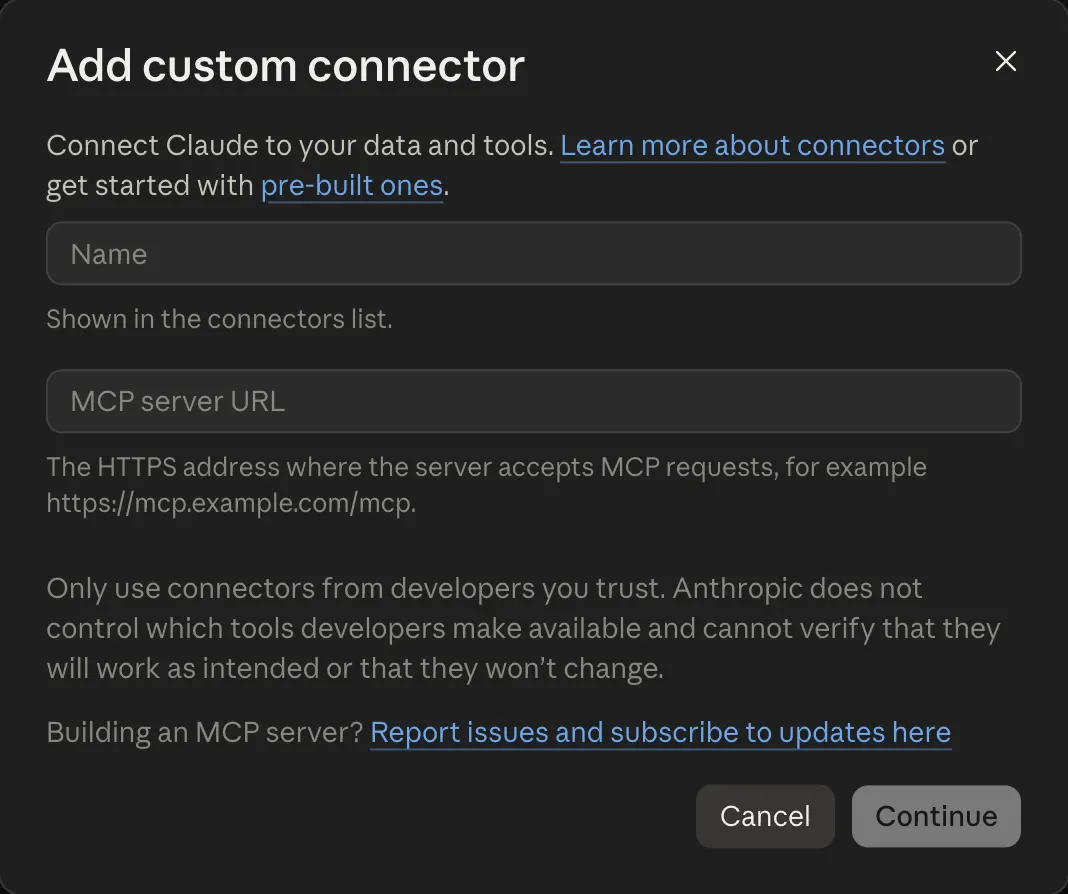
-
Sign in or sign up, then approve
Claude sends you to Radi8. Sign in, or create a Radi8 account if you do not have one yet, and approve the connection. You land back in Claude when it is done. If Claude does not send you, find Radi8 in your Connectors list and click Connect.
-
Turn it on in a chat
Start a new chat, open the tools menu (the + or sliders button under the message box), and make sure Radi8 is switched on. Then ask:
What does Radi8 know about my brand?
- Once you add Radi8 on claude.ai, it also shows up in the Claude desktop and mobile apps.
- On a Claude Team or Enterprise plan, an owner adds the connector for the organization first. After that, each person clicks Connect and signs in with their own Radi8 account.
- If you cannot add a custom connector, your Claude plan may not include them, or your organization owner may need to add it.
Stuck?
Open Claude with a prompt that reads our install guide and walks you through it one step at a time.
Troubleshooting
Radi8 is connected but the chat does not use it.
Start a new chat. Connections made mid-conversation often are not picked up until the next one. In Claude, also check that Radi8 is switched on in the tools menu.
It is drafting for the wrong brand.
Radi8 opens on your Personal workspace. Ask the chat to list my Radi8 accounts and then switch to the company you want. It confirms which workspace is active before it writes anything.
Sign-in fails or Radi8 stops responding.
Disconnect Radi8 in your assistant's settings and connect again. You can also see and revoke every connection under Settings in the Radi8 app.
It says I am out of credits or need a subscription.
A new account comes with credits to try Radi8. Once they are used up, Radi8 needs a subscription to keep working. Sign in at app.radi8.com to pick a plan, then start a new chat.
Still stuck? Email support@radi8.com. What the connection can and can't do: connector reference.