
One video. A month of posts.
Paste a YouTube link to a talk, webinar, or podcast interview. Radi8 breaks it into distinct post ideas, each pulling its own thread, and spreads them across your calendar.
Free for 30 days with 100,000 AI credits, no credit card. Plans from $35/month.

You already said the good stuff.
A talk holds more ideas than one post can carry. Share the link and you get one post, maybe a thank-you to the host, and the rest of what you said goes quiet. Fission pulls those ideas apart so each one gets its own day on your calendar.
From a YouTube link to a planned month.
Paste the YouTube link
A talk, webinar, or interview you've published. Anything where you explain what you know.
Get distinct ideas
Not the same summary cut five ways. Each idea takes its own angle on what you said.
Put them on your calendar
Pick a month and the ideas you want, and they land across it as plan items. Radi8 drafts each one in your voice.
Every video becomes a stock of ideas.
Fission keeps each video you've run through it, with a count of its ideas: how many are published, how many are on a plan, and how many are left.
-
Dozens of angles, not one summary
A single interview can turn into two dozen ideas, each a post that stands on its own.
-
Leftovers keep
Ideas you don't use this month stay with the video. Spend them in another month without processing it again.
-
Guests get the credit
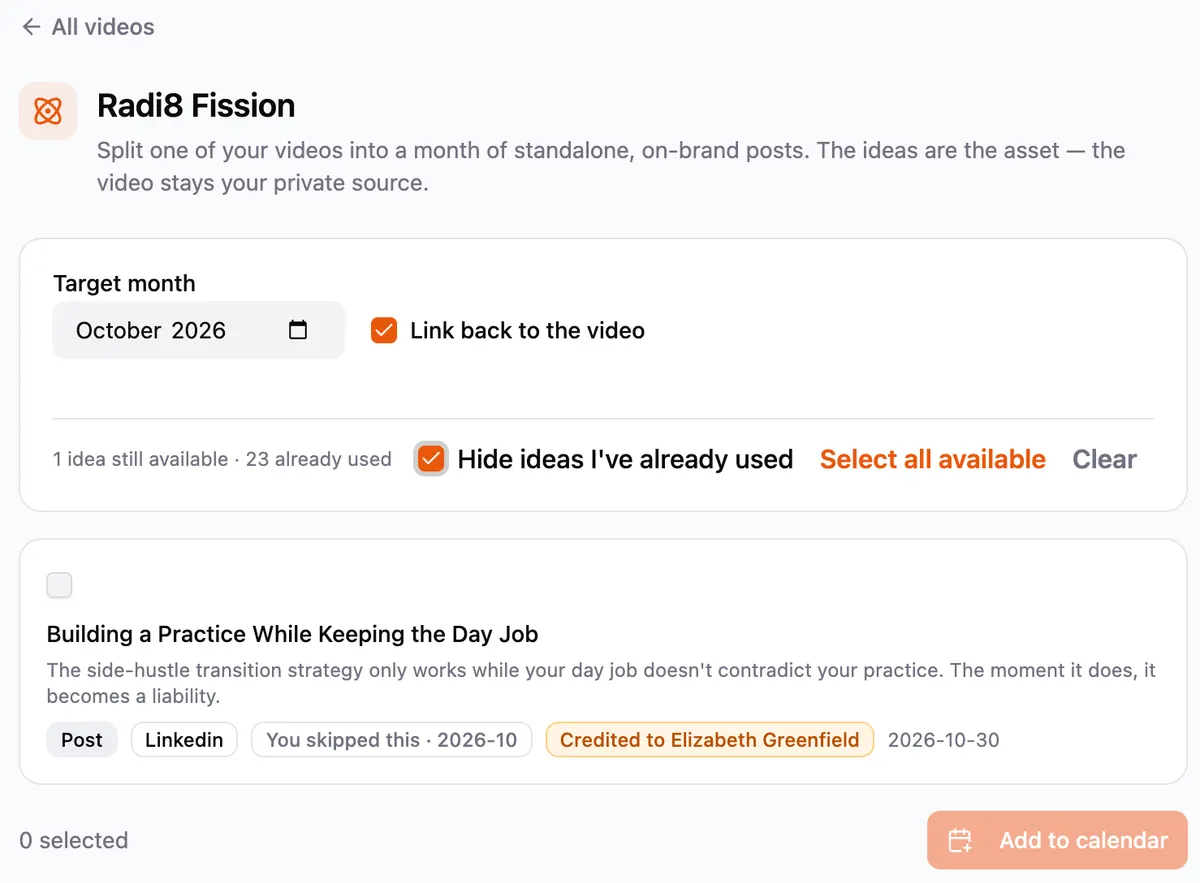
When an idea came from the person you interviewed, Radi8 credits them by name.
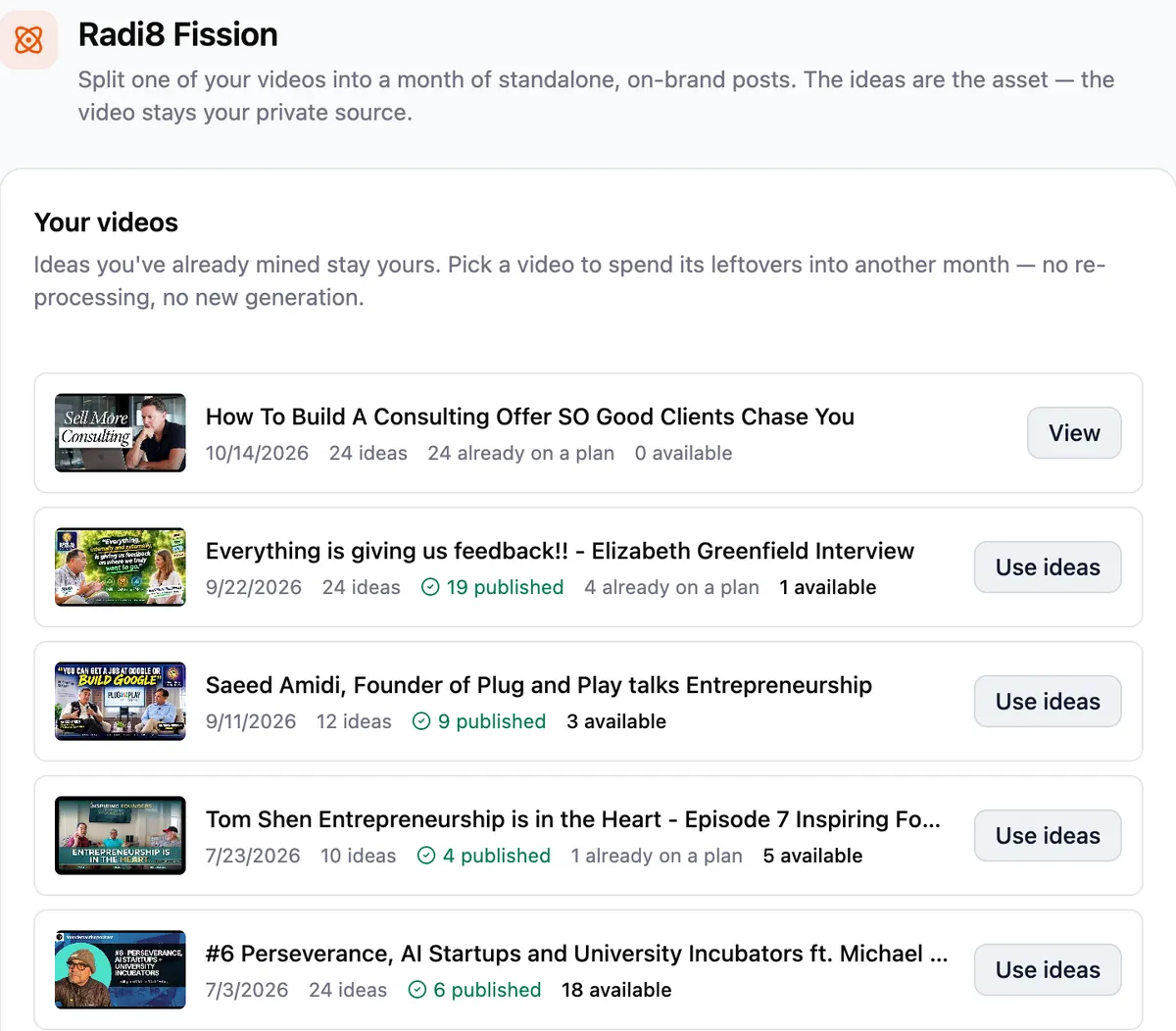
Choose the month, then the ideas.
Open a video, set the month you're planning, tick the ideas you want, and add them to your calendar.
-
Each idea comes with its point
A title, the argument it makes, and the channel it suits, so you can tell at a glance which ones you want.
-
Link back, or don't
Posts can point people back to the video, or leave it as your private source.
-
Only what's left
Ideas you've already used drop out of view, so picking next month's takes a minute.
Suggestions, not posts.
Fission plans the month. You decide what goes out.
You choose
Plan items are ideas waiting on your calendar. Nothing becomes a post until you pick it and review the draft.
In your voice, on every channel
Each draft starts from your brand context, with its own version for every channel you post to, not one caption pasted everywhere.
Ready for Autonomous
If you turn on Autonomous, it draws on your plan items to fill open slots in your weekly target. It's off until you switch it on.
Questions about Fission.
What is Fission?
Fission is the part of Radi8 that turns one long video into a month of posts. Paste a YouTube link to a talk, webinar, or interview you've published, and Radi8 breaks it into distinct content ideas, each with its own angle, then spreads them across your calendar as plan items.
What can I give it?
A YouTube link to a long-form video: a talk, a webinar, an interview, anything where you explain what you know. Fission takes YouTube links, so a recording that only lives on your laptop needs to go up on YouTube first.
Does Fission post anything on its own?
No. Fission fills your calendar with plan items, which are suggestions, not posts. You choose which ones become posts and review each draft. If you've turned on Autonomous, it can draw on plan items to fill an open slot, and Autonomous is off until you switch it on.
Will the posts sound like me?
Yes. The ideas come from what you said in the video, and each draft is written from your brand context (your voice, your audience, your offers), with its own version for every channel you post to.